The problem
Many command-line programs choose their own colours, and many of them assume a dark terminal: pale grey, light yellow or white text that looks great on black. Run one on Term's light theme and parts of its output fade into the white background. You can tell something is there, but not what it says.
It happens the other way round too: a program made for light terminals can draw dark text that vanishes on a dark theme.
What Term does now
Term checks each piece of text as it is drawn. When the colour is too close to the background behind it, Term darkens it (on a light background) or lightens it (on a dark one) — just enough to read, keeping its hue, so a pale yellow becomes a readable yellow, not black.
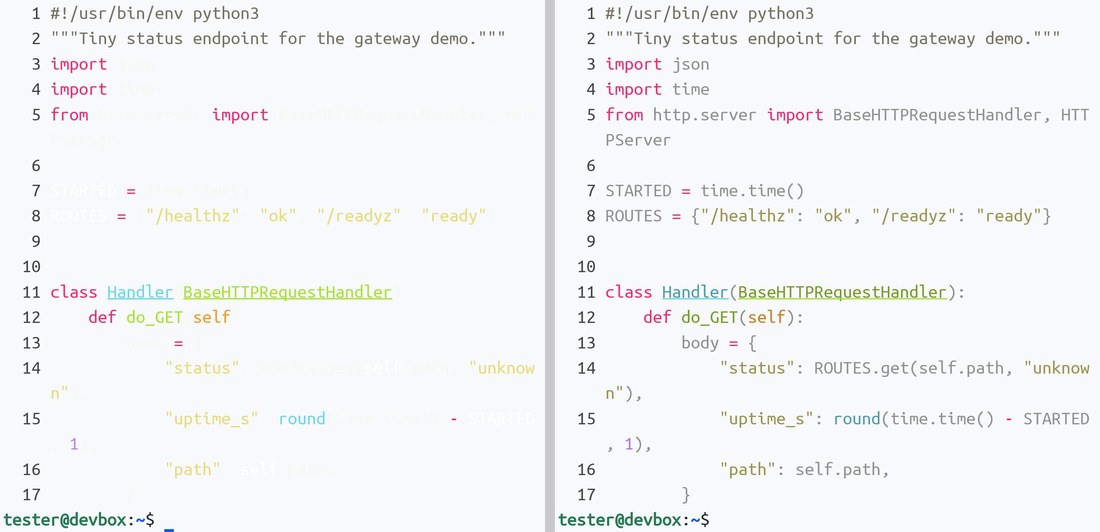
Where you might meet it
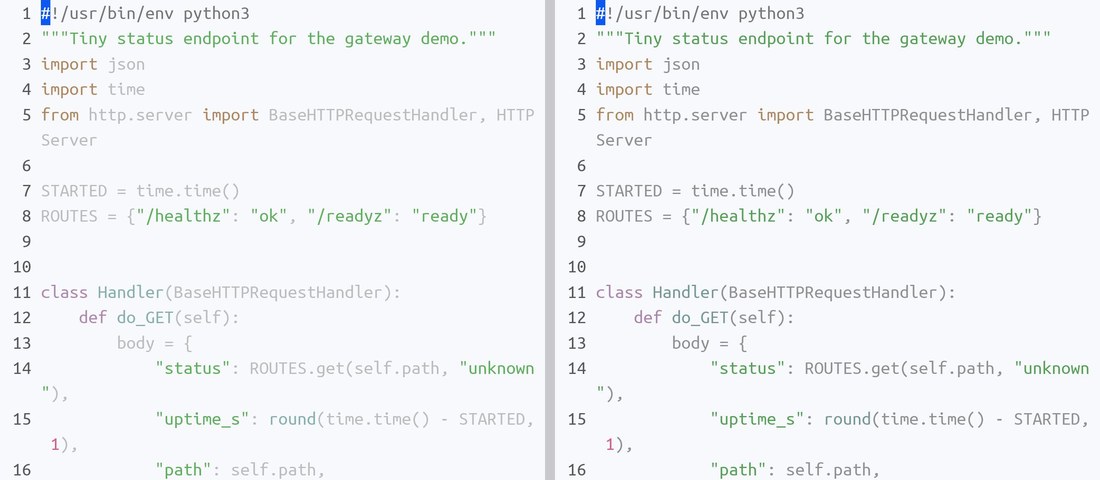
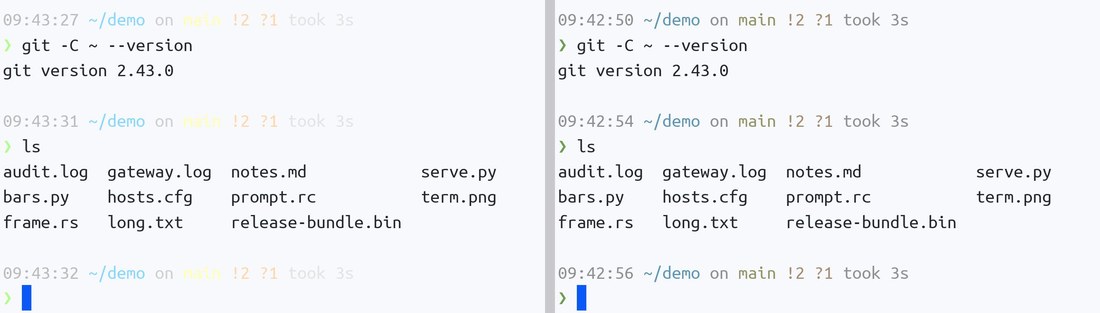
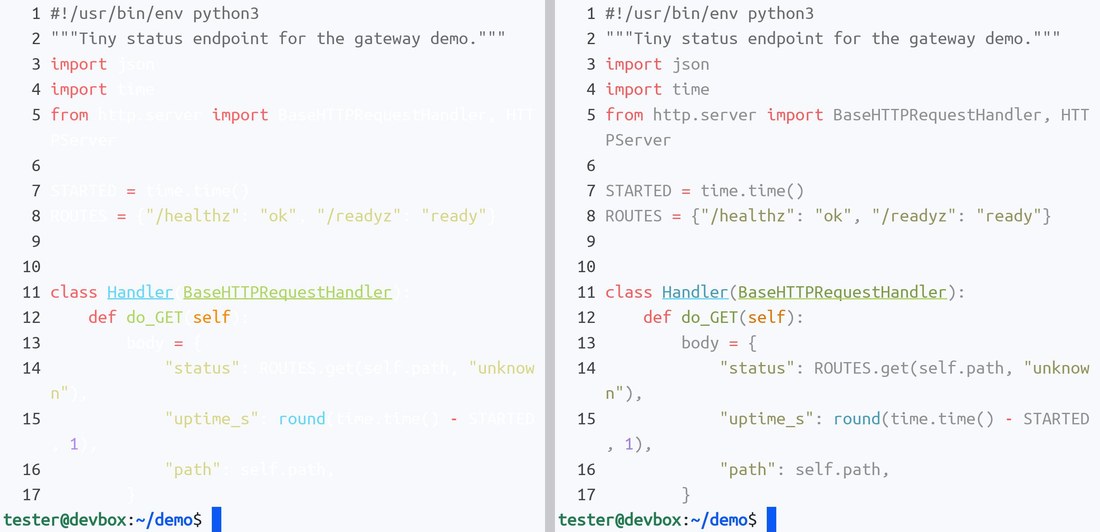
The picture above is the most common case: a code viewer whose default colours assume a dark terminal. These are the others we see most often, each shown with the setting off (left) and on (right).
An editor theme with a see-through background. Many vim and Neovim setups pair a dark colour scheme with a "transparent background", so the editor shows the terminal's own background behind the code. On a light theme, the scheme's pale grey text lands on white.
A shell prompt with quiet greys. Popular prompt themes draw the clock, the git branch and how long a command took in very light colours, so they stay in the background on a dark terminal. On a light one they disappear.
When full colour does not reach the program. Inside sudo, some tmux setups, or a server that does not pass the colour setting on, programs fall back to a smaller set of 256 colours. That set has its own very pale greys and creams, which no light theme can adjust. Keep text readable covers these just the same.
What stays exactly as drawn
- Colours that already read well. Most text is never touched. A program that picks a light theme for a light terminal looks exactly the same with the setting on or off.
- A dark theme's quiet colours. On a dark background Term only steps in when text is truly hard to see, so dimmed comments and hints keep the subtle look their theme designed.
- Lines, boxes, blocks and emoji. Frames, progress bars, Powerline separators and pictures are not text to read, so they are left alone.
- Hidden text. Text a program deliberately hides stays hidden.
Turn it on or off
It is on by default. To change it, open Settings → Terminal; Keep text readable is under Appearance, right below the terminal theme.
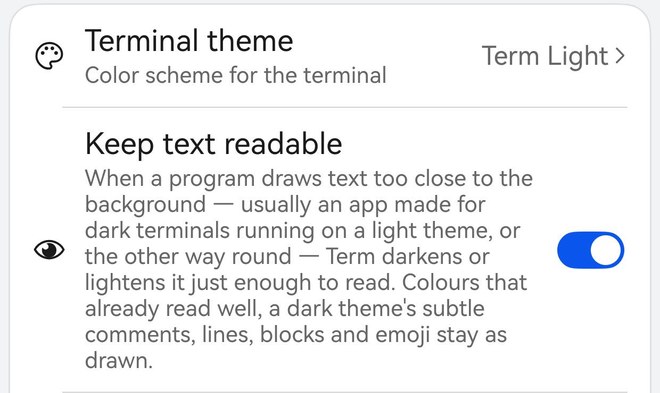
The switch takes effect at once, in every open session — no need to reconnect.
What it costs
Almost nothing. With a full screen of text — 120 columns by 50 rows, 6,000 characters — the check adds about 0.02 ms per frame in our measurements on a laptop chip, and we estimate about 0.05 ms per frame on a phone. One frame at 60 frames per second lasts 16.7 ms, so that is well under one percent of a frame, and scrolling feels exactly the same.
Why does a program get it wrong?
Good terminal programs ask the terminal what colour its background is and pick a matching theme. Term always answers. But some connections never pass the question on — a stock mosh server is one — and then the program has to guess, and the guess is usually "dark". Keep text readable covers that case. With termosh in place of mosh-server, the question gets through and the program can choose a light theme itself.
Prefer the program's own fix?
If a program has a light theme or a setting for it, that will always look best. Keep text readable is the safety net for when it does not.