When you reach the computer that runs your coding agents from Term, your terminal travels over networks you do not control, and sometimes through a relay we run. So the first question is fair: can anyone in between see what you type, or what your agents print?
No. Only your phone and your computer hold the keys that open a session. Our service helps them find each other and can pass sealed packets along, but it cannot read them, and it cannot add a device to a computer you have already paired. This post shows how, with no prior knowledge needed. There is a short technical section at the end for the curious.
Who holds which key
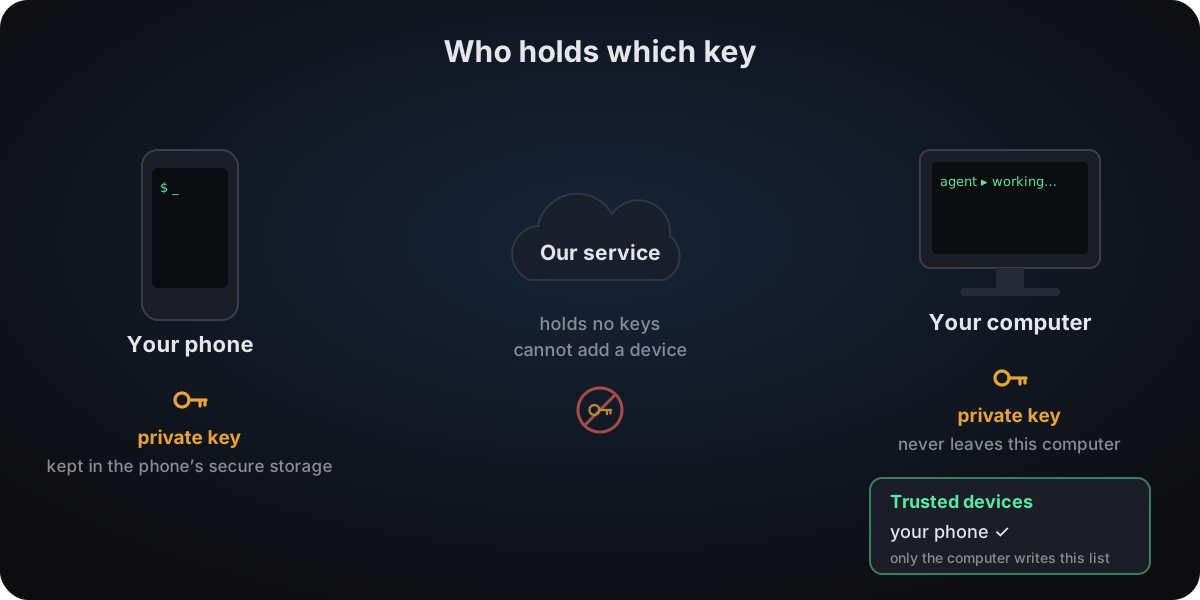
- Each device makes its own key pair. Your phone creates one the first time it is needed, and so does the small helper on your computer. The private half never leaves the device that made it.
- On the phone, the private key is in HarmonyOS's secure storage (Asset Store Kit): encrypted by the system with its own key, readable only by Term, and only after the phone has been unlocked once since it started. It is not in Term's database, and Term never copies it off the phone.
- On the computer, the private key is in the helper's settings file, readable only by the account the helper runs as. Our software never sends or copies it anywhere — though your own backups of that computer will include the file, like any other.
- Your computer keeps its own list of trusted devices. Pairing adds your phone's public key to that list. When anyone tries to connect, the computer checks that list itself — not our service, not an account. Nothing outside your computer can add a device to it: only a pairing your computer took part in can. Removing devices from the outside is possible on purpose — it is how you lock out a lost phone.
Pairing, once
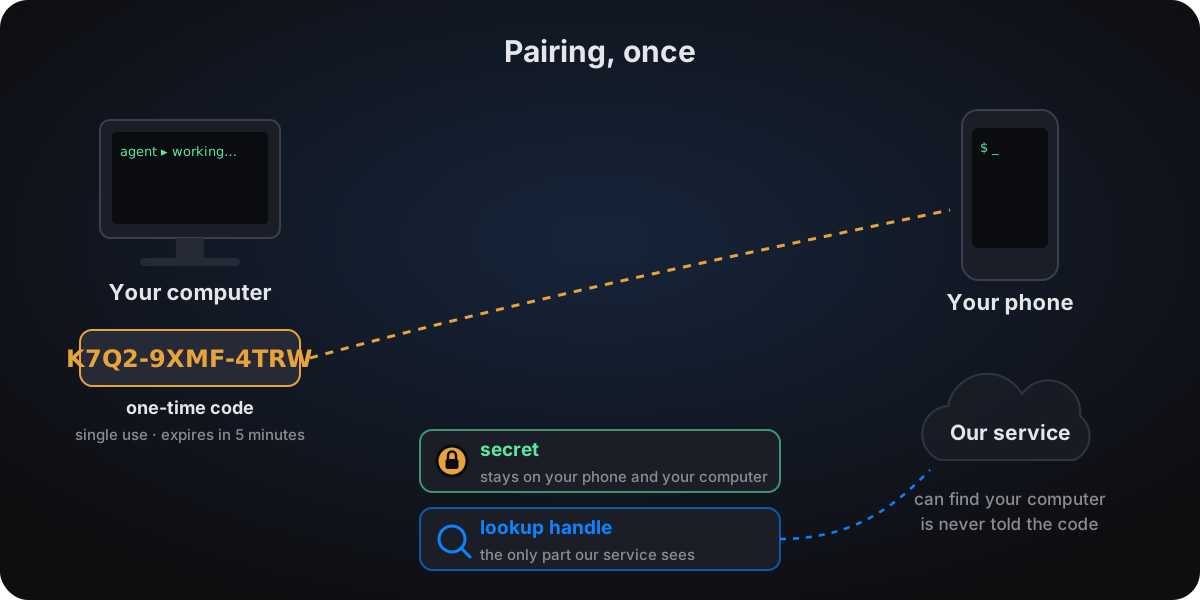
The helper on your computer shows a twelve-character code (and a QR code of the same thing). You type or scan it on your phone once.
- The code only works once, and only for five minutes.
- Both devices turn the code into two different things. A secret, which the computer uses to confirm that the phone saw the code, and a lookup handle, which is all our service is ever told. From the handle it can find your computer, but it cannot work out the code or the secret from it.
- After pairing, the code is useless. From then on your phone is recognised by its key, not by anything you typed.
Every connection
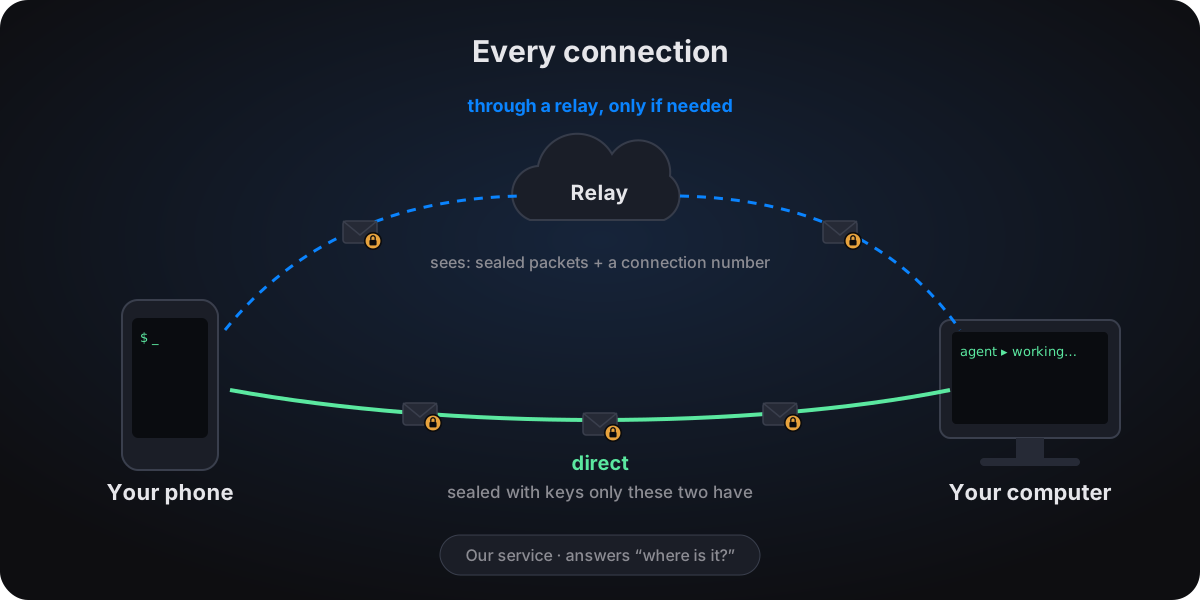
- Your phone asks our service where your computer is (its current addresses, and a relay to use if needed).
- Your phone and your computer prove who they are to each other. Each shows it holds its private key, and your computer checks the phone against its own trusted list. A device that is not on the list gets nowhere.
- That exchange produces fresh keys for this session only. Every packet after it — what you type, what your agents print — is sealed with them.
- The packets go straight from phone to computer whenever the network allows. When it does not (some home routers and mobile networks block it), they go through a relay. The relay forwards sealed packets and nothing else: it holds no key that could open them, and none that could make it look like your phone to your computer. What it does see is both ends' network addresses, a connection number, and the timing and size of the packets.
A forged or tampered packet is rejected, and a replayed one changes nothing.
What our service sees, and what it does not
| Our service can see | It never sees |
|---|---|
| The devices and computers on your account: their public keys, names (your phone's model; a computer's name defaults to its hostname), OS and version, app or helper version, first and last seen | What you type |
| Network addresses: a computer's public address and its local ones, and your phone's public address when it connects | What your agents or programs print |
| Which computer each phone looks up, and when; whether it was last reached directly or through a relay | Commands, file names, folders, window titles, session names |
| For each computer, every ~25 s: how many sessions are open, how many are waiting for you, and its load | Your pairing codes, or any key |
Your account appears there only as an anonymous ID; the link to your Huawei account is held by our separate account server. The relay additionally sees the addresses, timing and amount of data for connections it carries. And any device that knows a computer's public key — including a phone you have removed — can ask where that computer is and whether it is online; it still cannot connect.
What happens if…
- Someone photographs a code after you used it. Nothing: it has been used up.
- Someone gets an unused code within its five minutes. They could pair: a fresh code is a password for one pairing, so only show it to yourself. Every paired device is listed in the app and on the computer, and can be removed.
- Our servers were compromised. An attacker still could not read your sessions, add a device to a computer you have already paired, or send your phone to a fake computer — the keys and the trusted list are on your devices. They could see the information above, remove devices or stop the service working.
- You lose your phone. Remove it from another device in the app. Your computer is told at once if it is online, or as soon as it next connects; it drops the phone from its list and closes its sessions. Without any network,
termconnect unpairon the computer does the same. - You get a new phone. Pair again. Term never copies the phone's private key off the phone, which is why a new phone — or a reinstall — has to be paired.
What this does not protect
The keys keep everything between your devices private. They cannot help if your phone or your computer itself is compromised: whoever controls the computer controls its shells anyway. Keep both up to date, use a screen lock on your phone, and remove devices you no longer use.
For the technically curious
- Keys: each phone and each computer has one X25519 key pair. Pairing records the phone's public key in the computer's allowlist.
- Handshake: every connection starts with a Noise IK handshake (Noise_IK_25519_ChaChaPoly_BLAKE2s) against the static keys pairing recorded, so both sides are authenticated and the session keys are fresh each time.
- Packets: every datagram is sealed with authenticated encryption (AES-128-OCB3) under per-channel keys derived from that handshake. Forged or tampered packets are rejected; the control channel has a strict replay window, and terminal traffic is state synchronisation, so a replayed packet changes nothing.
- Pairing code: twelve characters, 60 bits, single use, valid for 300 seconds. Domain-separated hashes turn it into the secret, the lookup handle and the connection number; the service is told the handle only.
- Visible on the wire: the connection and channel numbers travel in the clear so packets can be routed, along with packet sizes and timing. They do not reveal content, but they let an observer on the path follow one connection, even across reconnects.