Update, 4 November: most of this now works day to day on our own phones and machines. See Reaching your AI machine: early progress for what works so far, with screenshots.
The problem
Many of you run your own AI studio: a desktop or a server at home or in the office where Claude Code, Codex and other agents work through long tasks. When you are away, you want a terminal on that machine from your phone.
Getting to that machine is the hard part. It sits behind a home router with no public IP, or its address changed overnight. The usual answer is a VPN or a tunnel tool such as Tailscale: one more app on both ends, one more account, one more thing that has to be running and connected before Term can do anything. Day after day, the step before the terminal is the one that fails.
What we are building
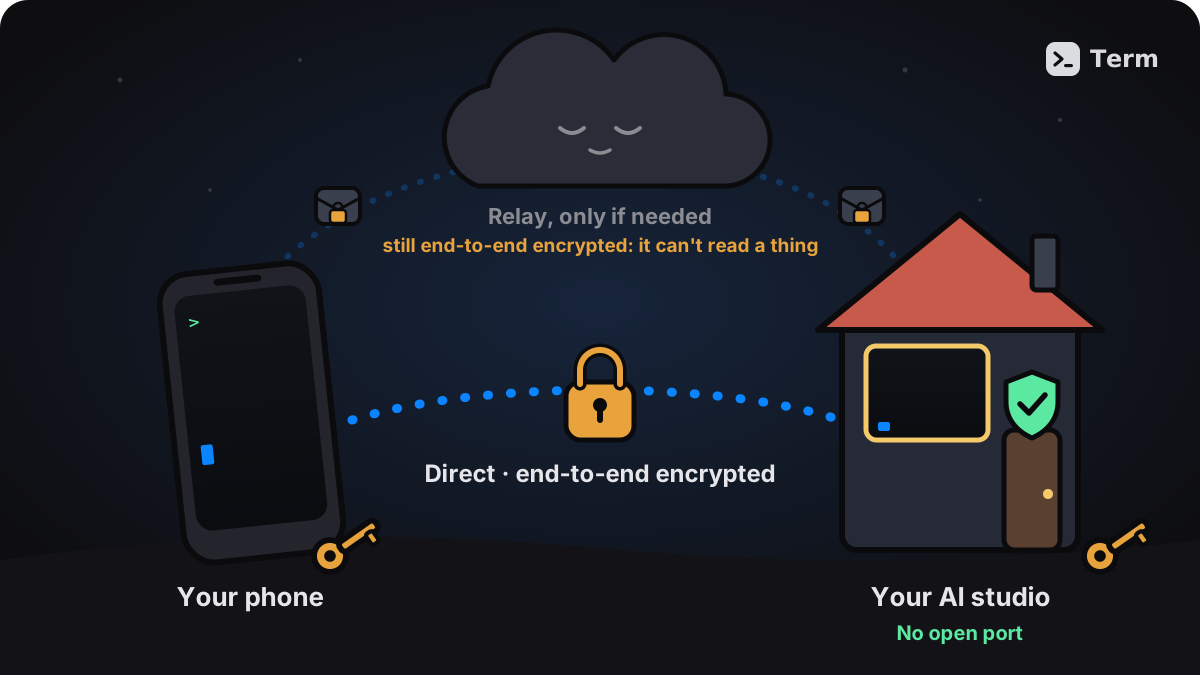
A small helper that you install once on that machine. You pair your phone with it once, by scanning a QR code or typing a short code. After that the machine is simply in your host list, and a tap opens a terminal on it:
- no VPN or tunnel app on either side;
- no public IP, port forwarding or router settings;
- no SSH passwords or keys to look after;
- your phone talks straight to your machine whenever the network allows. When it cannot, an encrypted relay steps in, and steps out again on its own once a direct path opens — your session carries on.
It is a way to connect, and only that. Once you are in, it is the same Term terminal you already use. Like mosh, it carries the terminal and nothing else by design: no file transfer (SFTP) and no port forwarding.
In testing against a real home router, most sessions connected directly; the rest fell back to a relay automatically.
Made for phones
Phones change networks, lock their screens and close apps in the background. We borrowed what works so well in mosh: instead of replaying everything that happened while you were away, the connection sends what the screen shows now. On weak mobile data you jump straight to where the agent is, and coming back after the app was closed picks up where you left off.
You can run several sessions on one machine — one agent in each — and switch between them.
Secure by design
- End-to-end encrypted. What travels between your phone and your machine is encrypted with keys that only those two hold. Our servers and relays only pass sealed data along; they cannot read it.
- Only the devices you paired get in. Your machine keeps its own list of paired devices, and no server can add to it — not even ours can pair a device with your machine.
- The pairing code stays with you. We never see it.
- Nothing waits at an open port. Your machine opens no port to the internet for strangers to knock on.
- You stay in charge. Remove any paired device from a machine whenever you like.
What our service does see, so you know: which of your devices are paired, when they connect, and from which network. Never what you type or what your agents print.
Where it stands
The connection itself works and has been tested through real home routers, but this is not something you can turn on yet, and getting it right may take a while. It will be part of Term Pro, and before it opens we will invite some Pro users to try it early.
What is not there yet, so nothing comes as a surprise:
- It runs on Linux and macOS. Windows is not supported.
- Some networks block the kind of traffic it uses. A fallback for them is not built yet.
- A session ends if the helper on your machine restarts. Run your agents inside tmux and they carry on.
Tell us how you work
If you run coding agents on your own machines, we would love to hear from you in Settings › Account › Feedback & suggestions, and to know if you would like to be among the first to try it:
- What machines do you run agents on, and which OS?
- How do you reach them today, and what bothers you about it?
- Would you install a small helper on that machine?