Why y does not reach your phone
In vim, y copies into vim's own register. That register lives in vim, on the server, and nothing ever sends it anywhere else. You can paste it back with p in the same vim, but your phone never hears about it.
The system clipboard registers, "+ and "*, do not help either. On a server they mean the server's own desktop clipboard, and a server has no desktop. Most server builds of vim say so outright: vim --version shows -clipboard, and "+y does nothing. Even a vim that has a clipboard would copy to the server's clipboard, not the phone's. SSH carries your keys and the screen between the two computers, not their clipboards.
One thing does get from the server to your phone: an escape sequence called OSC 52. A program prints it, and the terminal puts the text on the clipboard of the device it runs on. Term supports it: the text goes straight to the phone's clipboard. vim does not send OSC 52 by itself, so it needs a plugin to do it.
Install vim-oscyank
vim-oscyank is a small plugin that sends a copy as OSC 52. On the server, install it as a vim package, with no plugin manager needed:
mkdir -p ~/.vim/pack/plugins/start
git clone https://github.com/ojroques/vim-oscyank ~/.vim/pack/plugins/start/vim-oscyank
With vim-plug instead, add Plug 'ojroques/vim-oscyank', {'branch': 'main'} to your ~/.vimrc and run :PlugInstall.
Copy every yank to the phone
The plugin only acts when asked. To make every ordinary yank go to the phone too, add this to ~/.vimrc:
" Copy every yank to the phone's clipboard (vim-oscyank, OSC 52)
autocmd TextYankPost *
    \ if v:event.operator is 'y' && v:event.regname is '' |
    \   execute 'OSCYankRegister "' |
    \ endif
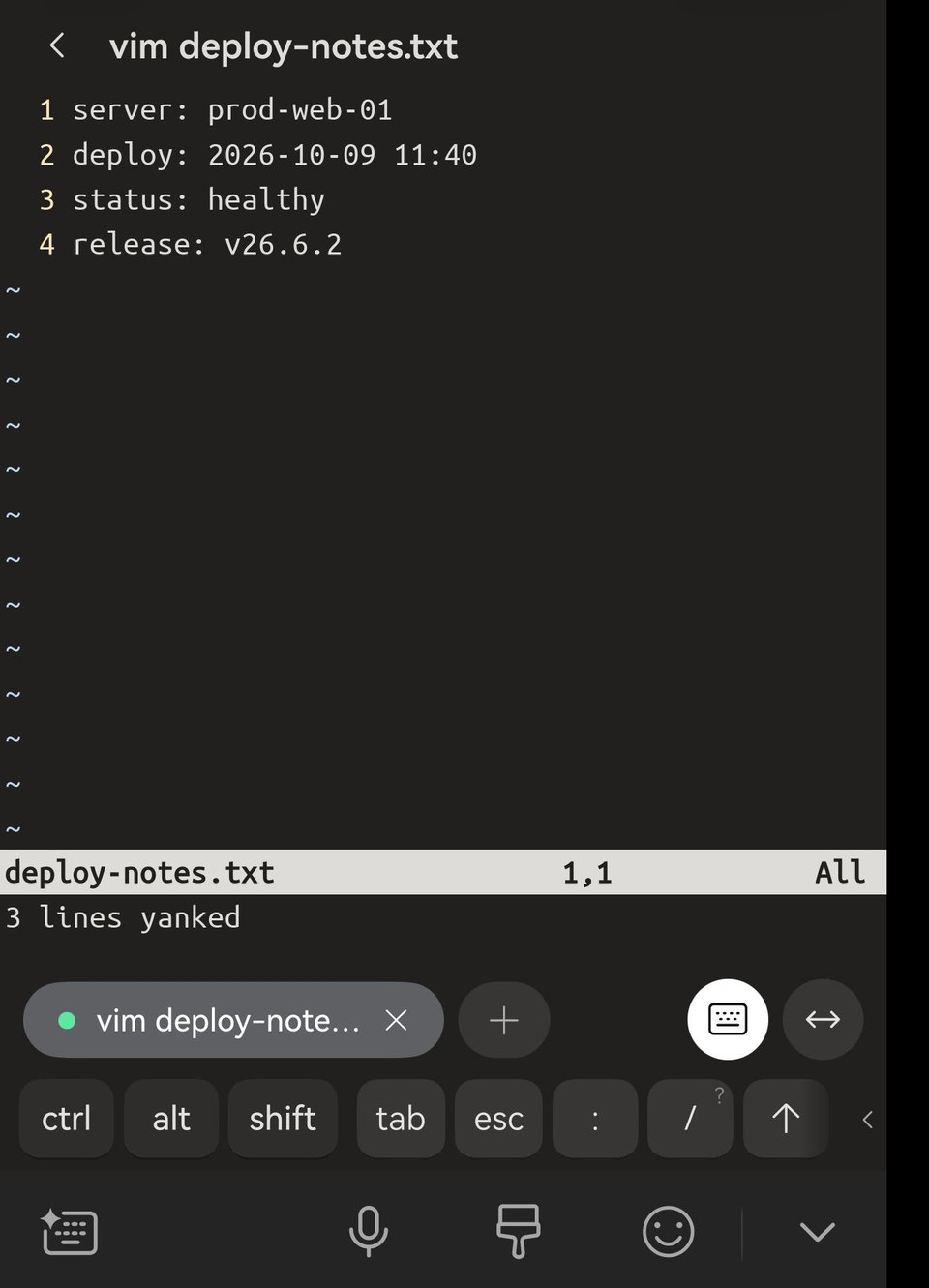
Now yy, yw, V then y — any yank into the default register — also lands on your phone, and vim says so: [oscyank] 61 characters copied. The text shows up in the keyboard's From clipboard row straight away, and it pastes anywhere on the phone. Back in Term, paste it with a long-press next to the cursor or Ctrl+Shift+V — see Copy and paste in the terminal.
![vim in Term on a phone after V, j, j and y with vim-oscyank: vim reports [oscyank] 61 characters copied, and the HarmonyOS keyboard offers server: prod-web-01 deploy: 2026-10-09 under From clipboard.](/_astro/yank.D09L7FeM.jpeg)

Deletes (d, x) and yanks into a named register ("ay) stay in vim, as before. To copy a single piece of text on purpose instead of every yank, the plugin's README gives a mapping: select it, then <leader>c.
Inside tmux: one line
tmux catches OSC 52 from the programs inside it. By default (set-clipboard external) it keeps the copy to itself, so vim says copied and nothing arrives on the phone. Tell tmux to pass it on:
set -s set-clipboard onThen reload with tmux source-file ~/.tmux.conf.
Over mosh, tmux needs one more line. mosh passes a copy on only in the form 52;c;, and tmux writes it as 52;;, so a copy made inside tmux is dropped on the way:
set -ag terminal-overrides ',*:Ms=\E]52;%p1%sc;%p2%s\a'vim-oscyank on its own, without tmux, already writes the 52;c; form, so plain vim over mosh needs nothing extra.
Neovim
The same plugin works in Neovim. Clone it into ~/.local/share/nvim/site/pack/plugins/start/ and put the same lines in ~/.config/nvim/init.vim.
Neovim 0.10 and later also has OSC 52 built in (let g:clipboard = 'osc52'). It copies to the phone, but it pastes with OSC 52 as well, by asking the terminal for the clipboard. Term does not answer that request (see below), so "+p stops with Waiting for OSC 52 response from the terminal and gives up. The plugin only copies, so it never waits. Paste with Term's own paste instead.
Copy only — programs cannot read your clipboard
This works in one direction. A program on the server can put text on your phone's clipboard, but Term does not let it read the clipboard back. That is a security decision: your clipboard often holds passwords, codes and private messages, and a read request can come from any program on any server you connect to — a script, a dependency, someone else's machine. So it stays closed for now. To paste from the phone into vim, use Term's paste in insert mode: you choose what goes in, and it lands at the cursor.
Long copies over mosh
mosh carries at most 16 KB of clipboard. A larger yank arrives cut short, with no error. Over SSH the limit is several megabytes.